


Unlock the Future of Video Processing with PyNvVideoCodec 2.0
Powerful hardware-accelerated video processing in Python is now more accessible than ever. Enter PyNvVideoCodec—an innovative NVIDIA Python-based library that facilitates GPU-accelerated video encoding, decoding, and transcoding. Built on the highly efficient NVIDIA Video Codec SDK, PyNvVideoCodec maximizes performance while being lightweight and user-friendly. It’s licensed under the MIT license and can be swiftly installed via pip, making it a prime choice for developers, engineers, and researchers.
What Is PyNvVideoCodec?
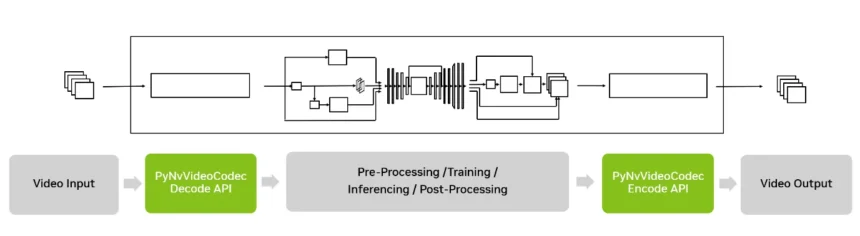
PyNvVideoCodec bridges the gap between complex video processing tasks and the Python programming language, enabling users to take full advantage of GPU acceleration without learning a new language. Whether it’s video analytics, AI preprocessing, media transcoding, or real-time streaming, PyNvVideoCodec 2.0 brings the efficiency of C++ to the flexibility of Python—enhancing your workflow and project capabilities.
Figure 1. The PyNvVideoCodec video processing pipeline enables GPU-accelerated decode and encode operations around an AI or signal processing stage.
What’s New in PyNvVideoCodec 2.0?
The launch of PyNvVideoCodec 2.0 introduces a range of exciting features that optimize video workflows across AI, broadcast, multimedia, and streaming applications. Let’s dive into what’s new.
Decode Enhancements
The new decode features in PyNvVideoCodec 2.0 are specifically designed to improve flexibility and performance:
- Frame Sampling and Seeking: Offers various frame retrieval methods— be it sequential, random, or periodic.
- Decoder Caching: Efficiently reuse decoders for short clips, avoiding the need for full reinitialization.
- Threaded Decoder: Offers zero latency by allowing background decoding.
- Buffer-based Decode: Directly processes video from memory buffers, ideal for streaming.
- Low Latency Decode: Supports zero-latency decoding for sequences without B-frames.
- SEI Extraction: Access HDR metadata, timecodes, and user data easily.
- Stream Metadata: Quickly retrieve information such as keyframe indices and resolutions.
- Optimized GIL Handling: Improved performance in threaded environments.
- Multi-GPU Decode: Scale your workloads seamlessly across multiple GPUs.
- Extended Codec Support: Compatibility with H.264, HEVC, AV1, and more.
- 4:2:2 Decoding: High-fidelity decoding of 4:2:2 H264 and HEVC content.
- Flexible Output Formats: Supports various output formats including NV12 and RGB24.
Encode Enhancements
On the encoding front, PyNvVideoCodec 2.0 also expands capabilities:
More Read

- Live Encoder Reconfiguration: Change encoding settings on the fly.
- SEI Insertion: Easily embed SEI messages.
- Multi-GPU Encoding: Distribute workloads across multiple GPU units.
- 4:2:2 Encoding: Allows for high-quality broadcast streaming.
- Extended Input Format Support: Ingest a wider range of input formats, enhancing compatibility.
Transcode Enhancements
The transcode capabilities have also received significant upgrades:
- Segment-based Transcoding: Transcode specific video segments according to timestamp ranges, which is optimized for deep learning and AI applications.
Easy Installation and Customization
Installing PyNvVideoCodec is straightforward, as demonstrated below:
bash
pip install PyNvVideoCodec
If you want to access the source code for customization, use:
bash
pip install PyNvVideoCodec.zip
For further customization, unarchive and install from source:
bash
unzip PyNvVideoCodec.zip
cd PyNvVideoCodec
pip install .
Get Started with PyNvVideoCodec 2.0
With all these performance improvements, PyNvVideoCodec 2.0 perfectly marries the NVIDIA Video Codec SDK’s power with Python’s simplicity.
To streamline your learning and implementation, PyNvVideoCodec includes sample applications and comprehensive documentation bundled in both the PyPI and NVIDIA NGC packages. From basic decode and re-encode scripts to specialized segmented transcoding examples, these resources are designed to easily integrate into your existing workflows.
Ready to revolutionize your video processing projects? Visit PyPI or NVIDIA NGC to kickstart your development journey!
Inspired by: Source


