


Microsoft Launches Copilot 3D: Transforming 2D Images into 3D Models
In a bold move to enhance its Copilot suite, Microsoft has introduced Copilot 3D—a groundbreaking feature designed to convert 2D images into immersive 3D models that can be used across various applications like game development, animation, and even 3D printing. This new tool is accessible for free, eliminating barriers for users eager to explore the world of 3D design without a hefty price tag.
How It Works: A Simple Process
Using Copilot 3D is straightforward. All that users need is a clean 2D image—no text prompts required. Microsoft suggests images with a clear background and a pronounced differentiation between the subject and the backdrop for optimal results. While experimenting with the tool, it became evident that images with evenly distributed lighting and a sense of depth yield the best outcomes, enabling the AI model to effectively interpret and translate 2D elements into a convincing 3D form.
Availability and Access
Copilot 3D is currently part of *Copilot Labs, functioning as a preview feature. Thankfully, you don’t have to be a Pro subscriber to try it. The service is open to all Copilot users globally, making it a fantastic opportunity for creators to test this innovative technology using the web version of Copilot.
Limitations in Human and Animal Models
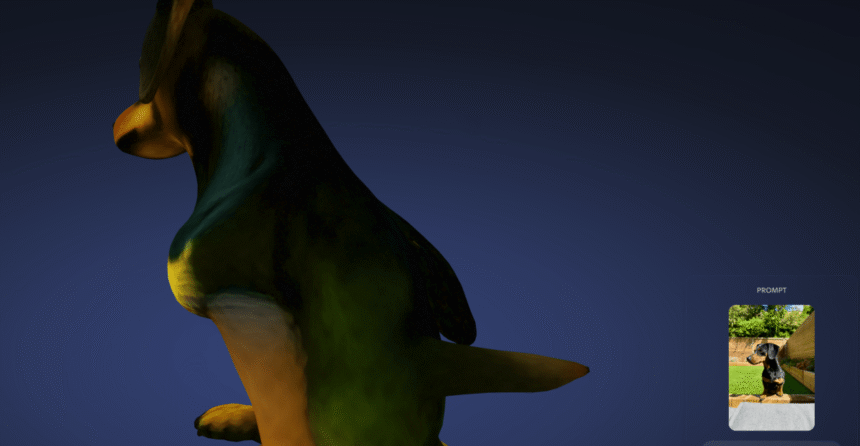
While Copilot 3D excels in transforming inanimate objects, it shows significant limitations when it comes to modeling animals and humans. In testing, I encountered a humorous yet bizarre issue when the AI made an odd interpretation of my dog’s anatomy. Instead of a smooth replication, the result was quite comical, showing the inherent challenges in generating complex organic shapes from 2D images.
Success with Everyday Objects
However, I found that Copilot 3D does remarkably well with various everyday items. I experimented with images of Ikea furniture, beach balls, umbrellas, and even bananas. The models created from the Ikea images were surprisingly accurate, allowing seamless integration into augmented reality applications. Even though Copilot 3D initially struggled with the umbrella image, changing to a photo with better depth resulted in an impressively realistic 3D model. The bananas? They were a straightforward success.
More Read

Technical Specifications and File Formats
To use Copilot 3D, you must submit 2D images under 10MB in either JPG or PNG format. Once transformed, these images are stored in a ‘creations’ section for 28 days. Users can download their models in GLB format, which is widely compatible with 3D viewers and game engines. For those looking to delve deeper into 3D design, GLB files can be converted into STL format, making it easy to import models into software like Blender or for 3D printing purposes.
Content Restrictions and Ethical Guidelines
During my testing, I attempted to generate 3D models from popular figures such as Tim Cook and Taylor Swift, but the tool consistently denied my requests with a “Cannot generate content” message. This is likely due to Microsoft’s built-in guardrails to prevent the misuse of the platform. Microsoft emphasizes the necessity of using original images that you own or have the rights to, prohibiting the uploading of images that depict individuals without consent or that are copyrighted. Interestingly, I did manage to create a rather uncanny model of my own face, despite the grotesque outcome.
Creative Limitations and Responsible Use
Interestingly, attempts to create 3D models of iconic characters like Mario were met with no restrictions from the AI, although the results were far from satisfactory. Microsoft has issued a warning that accounts could face restrictions or suspensions for uploading illegal content or violating the Copilot Code of Conduct, making it crucial for users to adhere to ethical guidelines while exploring the potential of Copilot 3D.
The launch of Copilot 3D marks an exciting step forward in the realm of AI-assisted design, providing users with a remarkable tool to bring their visions to life in three dimensions.
Inspired by: Source


