


Understanding fastText: A Comprehensive Guide to Text Representation and Classification
fastText is a powerful library designed for efficient learning of text representation and classification. Developed and open-sourced by Meta AI in 2016, fastText brings together influential ideas in the realms of natural language processing (NLP) and machine learning. By utilizing various techniques, fastText empowers users to create scalable solutions for text representation and classification tasks.
What Makes fastText Unique?
At its core, fastText operates on the principles of representing sentences through two primary methods: bag of words and bag of n-grams. This approach allows for a more nuanced understanding of text, capturing context and meaning beyond simple word occurrences. Additionally, fastText employs subword information, which enhances its ability to understand and generate representations for words that might not be frequently encountered in its training data.
Another standout feature of fastText is its use of hierarchical softmax. This technique accelerates computation significantly by leveraging the often imbalanced distribution of classes in natural language data. These capabilities make fastText especially suited for tasks that require high efficiency and scalability.
Accessing Word Vectors and Language Models
Hugging Face plays a pivotal role in making fastText models accessible. The platform hosts official mirrors of word vectors for 157 languages and provides the latest model for language identification. Users can easily download and implement these models with minimal commands, facilitating a smooth integration into their applications.
To locate the word vectors for various languages, you can navigate to the Meta AI organization on Hugging Face. For instance, English word vectors can be found here and the language identification model here.
More Read

Interactive Widgets for Enhanced Functionality
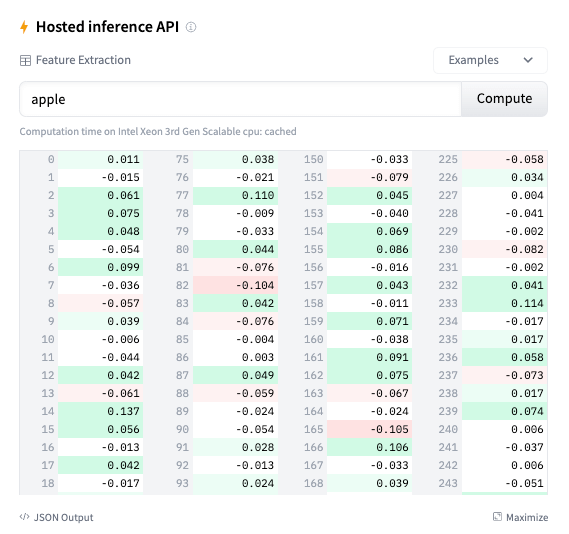
The integration of fastText with Hugging Face also includes support for interactive widgets. These widgets enable users to engage with text classification and feature extraction seamlessly. You can explore the language identification widget here and the feature extraction widget here.
How to Use fastText: A Step-by-Step Guide
Using fastText is straightforward, even for those who may be new to NLP. Here’s how to load and utilize pre-trained vectors:
import fasttext
from huggingface_hub import hf_hub_download

model_path = hf_hub_download(repo_id="facebook/fasttext-en-vectors", filename="model.bin")
model = fasttext.load_model(model_path)
print(model.words)

# Output: ['the', 'of', 'and', 'to', 'in', 'a', 'that', 'is', ...]
print(len(model.words))  # Output: 145940
print(model['bread'])  # Vector representation of the word 'bread'
Querying Nearest Neighbors
fastText also allows users to find the nearest neighbors of a word vector, which can be incredibly useful for various NLP applications:
model_path = hf_hub_download(repo_id="facebook/fasttext-en-nearest-neighbors", filename="model.bin")
model = fasttext.load_model(model_path)
neighbors = model.get_nearest_neighbors("bread", k=5)

# Output: [(0.5641, 'butter'), (0.4888, 'loaf'), (0.4491, 'eat'), (0.4244, 'food'), (0.4229, 'cheese')]
Language Detection
Detecting the language of a given text is another powerful application of fastText. Here’s how you can implement it:
model_path = hf_hub_download(repo_id="facebook/fasttext-language-identification", filename="model.bin")
model = fasttext.load_model(model_path)
prediction = model.predict("Hello, world!")

# Output: (('__label__eng_Latn',), array([0.8115]))
prediction_k = model.predict("Hello, world!", k=5)

# Output: (('__label__eng_Latn', '__label__vie_Latn', ...), array([0.6122, 0.2132, ...]))
Integrating Your Library with Hugging Face
If you’re interested in integrating your own library with Hugging Face, this is entirely possible thanks to the collaboration with Meta AI and the huggingface_hub library. This integration enables all widgets and APIs for the supported libraries. For guidance on how to get started with this integration, Hugging Face provides comprehensive documentation.
By leveraging the capabilities of fastText, you can enhance your NLP projects, making them more efficient and effective in handling diverse text-based tasks. Whether you’re working on text classification, language identification, or feature extraction, fastText offers a robust toolkit that can elevate your work.
Inspired by: Source


