


Unlocking the Power of Gemini 3: Your Comprehensive Guide to Accessing Google’s AI Model
It’s finally here! Gemini 3, Google’s flagship AI model, is now available. However, all the tech talk in the world doesn’t mean much if you can’t figure out how to use it. In this article, we’ll guide you through various ways to access Gemini 3, catering to audiences with varying technical skills. So, without further ado, let’s jump into it.
Simplifying Access to Gemini 3
No need to be a coding wizard or own a supercomputer to get started with Gemini 3. Here’s how you can access the model for free, broken down into user-friendly options.
The Most Accessible Way: Gemini App
The easiest way to access Gemini 3 is through the Gemini App or the browser version at gemini.google.com. This app runs on Gemini 3 and is open to all users. If you’re a Gemini Pro subscriber, you can opt for the Thinking Mode, which allows for longer and deeper responses, enhancing your conversational experience.
The Easiest Way: AI Mode
You can also access Gemini 3 via the new AI Mode. This feature enables a Gemini 3-powered view that significantly enhances your search experience. AI Mode can explain, summarize, plan, and create structured answers that go beyond simple search results. Here’s how to access it:
-
Search Interface: Simply perform a Google search and select AI Mode from the results.

-
Web Interface: Visit this link directly.


I suggest using the first method for a seamless search experience.
More Read

The Tech-Friendly Way: Gemini CLI
For tech-savvy users, the Gemini CLI allows direct interaction with Gemini 3 via the terminal. Currently, this option is available to Google AI Ultra subscribers or those with a paid Gemini API key. With CLI, you can generate code, scaffold apps, analyze files, and run agent-level tasks without disrupting your workflow.

The Most Functional Way: Google AI Studio
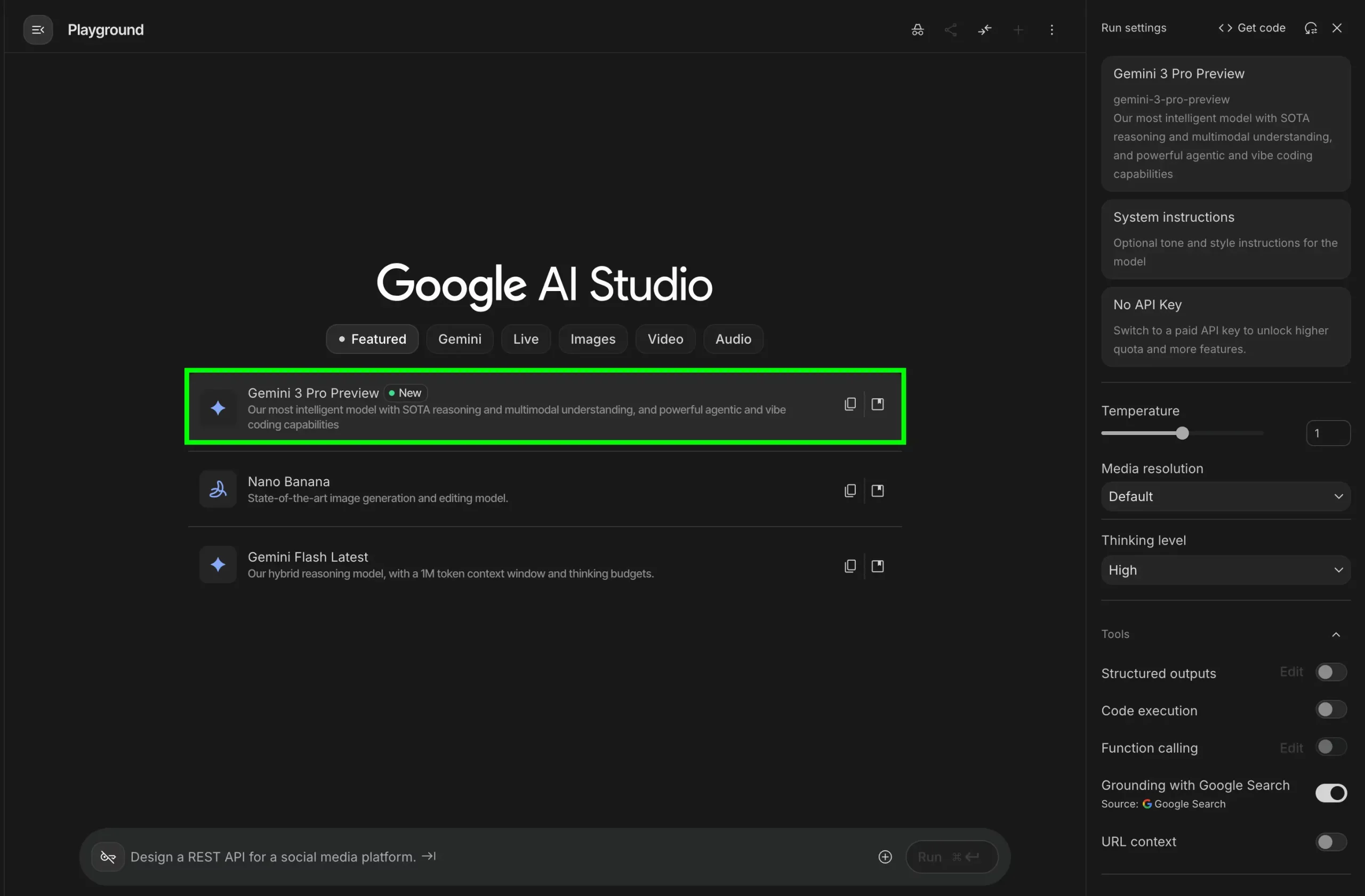
Google AI Studio is another excellent option that supports Gemini 3. This platform enables you to test multimodal inputs, explore agentic behaviors, and export working code directly to your applications. It’s one of my favorite approaches to access any new model released by Google, providing a unified interface for experimentation without needing to write any code.
The Controlled Way: Google API
Google also provides access to Gemini 3 via an API, specifically through Vertex AI. While this option usually requires payment, you can utilize the Google Studio API for free by creating a key. This gives you a range of capabilities tailored to your needs.
How to Choose Your Access Method?
The goal is clear: Google aims to make Gemini 3 accessible to everyone, regardless of their technical background. Each user, whether casual or professional, has a suitable entry point ranging from the Gemini app for basic exploration to the more in-depth functionalities offered by Google AI Studio.
Access to Gemini 3 is democratized; you won’t face barriers due to paid subscriptions. Your choice will depend on your specific use case and comfort level with technology.
Frequently Asked Questions
Q1. What’s the simplest way to access Gemini 3?
A: Use the Gemini App or the browser version at gemini.google.com. It now runs on Gemini 3 and supports Thinking Mode for Pro users.
Q2. How do I use Gemini 3 through Google Search?
A: Switch to AI Mode, which you can select directly from any Google search results or visit the dedicated AI Mode link.
Q3. Who should use the Gemini CLI?
A: This option is best suited for developers comfortable with terminal commands. It requires a paid API key or Ultra subscription.
Q4. Why use Google AI Studio for Gemini 3?
A: Google AI Studio provides a hands-on space to test multimodal inputs, adjust run settings, and export working code without the need for extensive coding knowledge.
Q5. Can I use Gemini 3 for free through the API?
A: Yes, while access via Vertex AI is paid, Google Studio offers a free API key that allows experimentation with Gemini 3 at no cost.
This guide aims to equip you with all the information needed to access and utilize Google’s innovative AI model, Gemini 3, regardless of your technical expertise. Dive in and explore the possibilities!
Inspired by: Source


