


Unlocking AI in Unity: A Guide to the Hugging Face Unity API
As technology continues to evolve, integrating artificial intelligence (AI) into game development is becoming increasingly essential. The Hugging Face Unity API provides a straightforward method for developers to incorporate powerful AI models into their Unity projects. This article will guide you through the installation process, usage, and advantages of using the Hugging Face Unity API to enhance your game development experience.
Getting Started with Installation
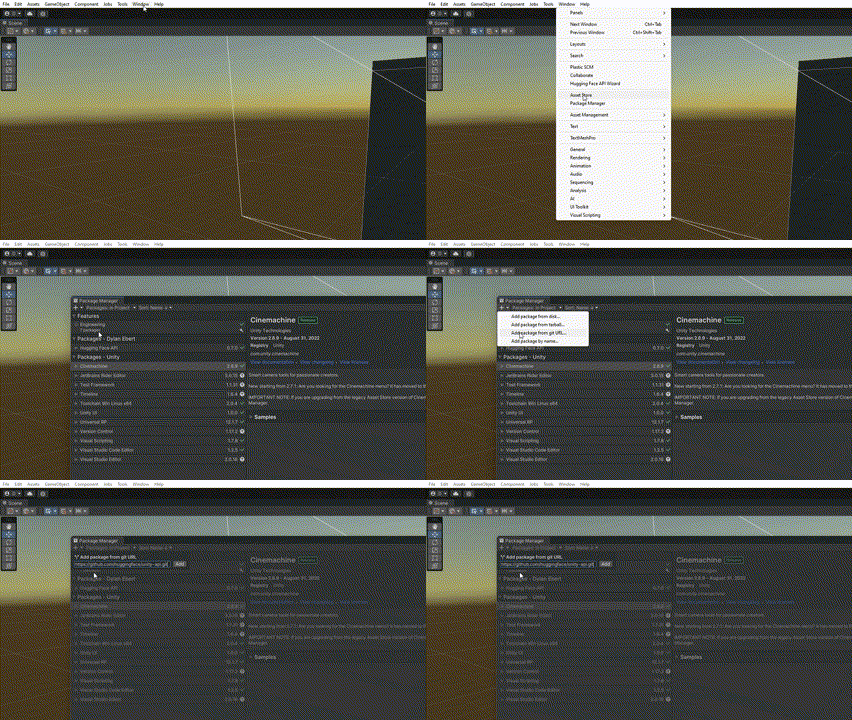
To get started with the Hugging Face Unity API, you need to install it within your Unity project. Here’s a step-by-step guide to help you through the installation process:
-
Open Your Unity Project: Launch Unity and open the project where you want to integrate the Hugging Face API.
-
Navigate to Package Manager: Go to the menu bar and click on
Window, then selectPackage Manager. -
Add the Package: Click on the
+icon and selectAdd Package from git URL. This allows you to add the Hugging Face Unity API directly from its repository. -
Input the Git URL: Enter
https://github.com/huggingface/unity-api.gitto initiate the download and installation. - Open the API Wizard: After installation, the Unity API wizard should appear automatically. If it doesn’t, you can find it by going to
Windowand selectingHugging Face API Wizard.
-
Enter Your API Key: Access your Hugging Face account settings to create an API key. Input this key into the API wizard.
-
Test Your API Key: Ensure the key works by clicking on the
Test API keyoption in the wizard. -
Adjust Model Endpoints: If you want to change the model you’re using, you can find the model endpoint by visiting the Hugging Face website. Go to the model page, click
Deployand thenInference API, and copy the URL from theAPI_URLfield. -
Advanced Settings: Optionally, configure advanced settings as needed. For more detailed instructions, visit the project repository.
- Install Examples: To see how the API works in practice, click on
Install Examples. You can then close the API Wizard and start coding.
Making Your First API Call
Now that you have the Hugging Face Unity API set up, making calls to the API in your scripts is straightforward. Here’s a sample code snippet demonstrating how to perform a Sentence Similarity task:
using HuggingFace.API;

/* other code */

// Make a call to the API
void Query() {
    string inputText = "I'm on my way to the forest.";
    string[] candidates = {
        "The player is going to the city",
        "The player is going to the wilderness",
        "The player is wandering aimlessly"
    };
    HuggingFaceAPI.SentenceSimilarity(inputText, OnSuccess, OnError, candidates);
}

// If successful, handle the result
void OnSuccess(float[] result) {
    foreach(float value in result) {
        Debug.Log(value);
    }
}

// Otherwise, handle the error
void OnError(string error) {
    Debug.LogError(error);
}

/* other code */
This example illustrates how to query the API for sentence similarity, handling both success and error responses effectively.
Supported Tasks and Custom Models
The Hugging Face Unity API supports various tasks beyond sentence similarity, enabling diverse functionalities in your game:
More Read

- Text Classification: Classify text into predefined categories.
- Text Generation: Generate text based on input prompts.
- Question Answering: Provide answers to questions based on context.
You can use the corresponding methods provided by the HuggingFaceAPI class to perform these tasks. Additionally, if you have your own custom model hosted on Hugging Face, simply change the model endpoint in the API Wizard to use it.
Usage Tips for Seamless Integration
To ensure a smooth experience when using the Hugging Face Unity API, consider the following tips:
-
Asynchronous Calls: Remember that the API functions asynchronously. This means that responses will be handled through callbacks, so plan your code accordingly.
-
Performance Considerations: If you encounter slow response times or performance issues, consider switching to lower resource models by changing the model endpoints. This can significantly improve the responsiveness of your game.
-
Testing and Debugging: Utilize the provided success and error handling methods to debug effectively and ensure a smooth user experience in your game.
- Explore Documentation: Regularly check the Hugging Face documentation for updates and additional features that can enhance your integration.
By leveraging the capabilities of the Hugging Face Unity API, you can create more engaging and interactive gaming experiences that utilize the power of AI. Whether you’re looking to implement complex AI-driven features or enhance gameplay with intelligent responses, this API provides the tools needed to elevate your projects to the next level. Start integrating today and see how AI can transform your game development journey!
Inspired by: Source


