By using this site, you agree to the Privacy Policy and Terms of Use.
Accept
AIModelKitAIModelKitAIModelKit
  • Home
  • News
    NewsShow More
    Concerns Rise as UK Shops Launch Facial Recognition Technology with Real-Time Police Alerts
    Concerns Rise as UK Shops Launch Facial Recognition Technology with Real-Time Police Alerts
    7 Min Read
    Fidji Simo Resigns from OpenAI’s AGI Leadership Role Due to Health Issues
    Fidji Simo Resigns from OpenAI’s AGI Leadership Role Due to Health Issues
    5 Min Read
    Reeves Unveils City Skills Compact: A Commitment from Firms to Retrain Employees in AI for the Financial Sector
    Reeves Unveils City Skills Compact: A Commitment from Firms to Retrain Employees in AI for the Financial Sector
    5 Min Read
    OpenAI Declares GPT-5.6 as the Preferred Model for Microsoft Copilot 365 Amid Rumors of Breakup
    OpenAI Declares GPT-5.6 as the Preferred Model for Microsoft Copilot 365 Amid Rumors of Breakup
    4 Min Read
    Microsoft’s Upcoming Patch Tuesdays Set to Expand with More Updates
    Microsoft’s Upcoming Patch Tuesdays Set to Expand with More Updates
    5 Min Read
  • Open-Source Models
    Open-Source ModelsShow More
    Discover TabFM: A Zero-Shot Foundation Model Optimized for Tabular Data Analysis
    Discover TabFM: A Zero-Shot Foundation Model Optimized for Tabular Data Analysis
    5 Min Read
    Maximizing Cloud Cost Efficiency Through Linear Elastic Caching Strategies
    Maximizing Cloud Cost Efficiency Through Linear Elastic Caching Strategies
    5 Min Read
    Unlocking Parametric Knowledge in LLMs: The Role of Reasoning in Recall
    Unlocking Parametric Knowledge in LLMs: The Role of Reasoning in Recall
    4 Min Read
    Transforming Pixels into Action: How Earth AI Revolutionizes Nature Restoration
    Transforming Pixels into Action: How Earth AI Revolutionizes Nature Restoration
    5 Min Read
    Exploring AI Innovations for Better Understanding of Skin Conditions
    Exploring AI Innovations for Better Understanding of Skin Conditions
    5 Min Read
  • Guides
    GuidesShow More
    Unlocking Multiple AI Models Through the OpenRouter API Quiz – A Comprehensive Guide by Real Python
    Unlocking Multiple AI Models Through the OpenRouter API Quiz – A Comprehensive Guide by Real Python
    4 Min Read
    Unlocking Multiple AI Models with OpenRouter API – A Comprehensive Guide by Real Python
    Unlocking Multiple AI Models with OpenRouter API – A Comprehensive Guide by Real Python
    4 Min Read
    Mastering User Input in Python: A Comprehensive Quiz on Keyboard Input Techniques – Real Python
    Mastering User Input in Python: A Comprehensive Quiz on Keyboard Input Techniques – Real Python
    3 Min Read
    Mastering GitHub Copilot for Code Review in Pull Requests: A Comprehensive Quiz from Real Python
    Mastering GitHub Copilot for Code Review in Pull Requests: A Comprehensive Quiz from Real Python
    1 Min Read
    How to Structure Your Python Script Effectively – Real Python Guide
    How to Structure Your Python Script Effectively – Real Python Guide
    3 Min Read
  • Tools
    ToolsShow More
    Boosting Performance with Native-Speed vLLM Transformers for Enhanced Modeling Backend
    Boosting Performance with Native-Speed vLLM Transformers for Enhanced Modeling Backend
    5 Min Read
    Hugging Face and Cerebras Launch Gemma 4 for Advanced Real-Time Voice AI Solutions
    Hugging Face and Cerebras Launch Gemma 4 for Advanced Real-Time Voice AI Solutions
    4 Min Read
    Unlocking Dopamine: How I Optimized NeuroBait for Enhancing Focus in ADHD Minds
    Unlocking Dopamine: How I Optimized NeuroBait for Enhancing Focus in ADHD Minds
    6 Min Read
    Optimizing Use-Case Based Deployments with SageMaker JumpStart
    Optimizing Use-Case Based Deployments with SageMaker JumpStart
    5 Min Read
    Safetensors Partners with PyTorch Foundation: Strengthening AI Development
    Safetensors Partners with PyTorch Foundation: Strengthening AI Development
    5 Min Read
  • Events
    EventsShow More
    NVIDIA and Hugging Face Unveil New Models and Frameworks for LeRobot: A Game-Changer for the Open Robotics Community
    NVIDIA and Hugging Face Unveil New Models and Frameworks for LeRobot: A Game-Changer for the Open Robotics Community
    5 Min Read
    NVIDIA Unleashes Scalable AI Compute Solutions, Calling on Partners to Drive AI Infrastructure Development
    NVIDIA Unleashes Scalable AI Compute Solutions, Calling on Partners to Drive AI Infrastructure Development
    5 Min Read
    How Jaiveer Singh is Accelerating Robotics and Developer Efficiency
    How Jaiveer Singh is Accelerating Robotics and Developer Efficiency
    6 Min Read
    NVIDIA Fuels More Than 400 of the World’s Top 500 Fastest Supercomputers
    NVIDIA Fuels More Than 400 of the World’s Top 500 Fastest Supercomputers
    5 Min Read
    HTB Defensive Operations Analyst Certificate Now Approved for DoD 8140 Compliance
    HTB Defensive Operations Analyst Certificate Now Approved for DoD 8140 Compliance
    4 Min Read
  • Ethics
    EthicsShow More
    Adaptive Strategies for Generating Bias-Eliciting Questions in Large Language Models (LLMs) – Research Paper [2510.12857]
    Adaptive Strategies for Generating Bias-Eliciting Questions in Large Language Models (LLMs) – Research Paper [2510.12857]
    5 Min Read
    Why AI Can’t Replace Mental Health Therapists: Key Areas Where It Can Enhance Care
    Why AI Can’t Replace Mental Health Therapists: Key Areas Where It Can Enhance Care
    6 Min Read
    Exploring Desirable Effort Fairness and Optimal Trade-offs in Strategic Learning: Insights from Paper 2510.19098
    Exploring Desirable Effort Fairness and Optimal Trade-offs in Strategic Learning: Insights from Paper 2510.19098
    5 Min Read
    Expert Opinions: Should Australia Halt New Data Centre Construction?
    Expert Opinions: Should Australia Halt New Data Centre Construction?
    5 Min Read
    Groundbreaking Device Revives Donor Eyeballs, Paving the Way for Successful Eye Transplants
    Groundbreaking Device Revives Donor Eyeballs, Paving the Way for Successful Eye Transplants
    5 Min Read
  • Comparisons
    ComparisonsShow More
    Cloudflare Launches Temporary Accounts for Seamless Autonomous Worker Deployment
    Cloudflare Launches Temporary Accounts for Seamless Autonomous Worker Deployment
    4 Min Read
    Optimizing Ensemble Diversity for Enhanced Subjective Supervision
    Optimizing Ensemble Diversity for Enhanced Subjective Supervision
    5 Min Read
    Data Alchemy: Reducing Cross-Site Model Variability with Test Time Data Calibration Techniques
    Data Alchemy: Reducing Cross-Site Model Variability with Test Time Data Calibration Techniques
    5 Min Read
    Enhancing Embedding Model Reasoning with Refine Thought: A Test-Time Inference Approach (2511.13726)
    Enhancing Embedding Model Reasoning with Refine Thought: A Test-Time Inference Approach (2511.13726)
    5 Min Read
    Enhancing Bifidelity Parameter Estimation with Conditional Diffusion Models: A Comprehensive Study
    Enhancing Bifidelity Parameter Estimation with Conditional Diffusion Models: A Comprehensive Study
    5 Min Read
Search
  • Privacy Policy
  • Terms of Service
  • Contact Us
  • FAQ / Help Center
  • Advertise With Us
  • Latest News
  • Model Comparisons
  • Tutorials & Guides
  • Open-Source Tools
  • Community Events
© 2025 AI Model Kit. All Rights Reserved.
Reading: Step-by-Step Guide to Accessing Local LLMs Remotely with TailScale
Share
Notification Show More
Font ResizerAa
AIModelKitAIModelKit
Font ResizerAa
  • 🏠
  • 🚀
  • 📰
  • 💡
  • 📚
  • ⭐
Search
  • Home
  • News
  • Models
  • Guides
  • Tools
  • Ethics
  • Events
  • Comparisons
Follow US
  • Latest News
  • Model Comparisons
  • Tutorials & Guides
  • Open-Source Tools
  • Community Events
© 2025 AI Model Kit. All Rights Reserved.
AIModelKit > Guides > Step-by-Step Guide to Accessing Local LLMs Remotely with TailScale
Guides

Step-by-Step Guide to Accessing Local LLMs Remotely with TailScale

aimodelkit
Last updated: April 13, 2025 8:00 am
aimodelkit
Share
Step-by-Step Guide to Accessing Local LLMs Remotely with TailScale
SHARE

Accessing Local LLMs Remotely Using Tailscale: A Comprehensive Guide

Image by Author | Canva & DALL-E

Contents
  • Why Access Local LLMs Remotely?
  • Tools Required
  • Step 1: Install & Configure Tailscale
  • Step 2: Install and Run Ollama
  • Step 3: Install Docker & Set Up Open WebUI
  • Step 4: Access LLMs Remotely
  • About the Author

Imagine this scenario: you’ve set up a powerful language model (LLM) on your local machine. It’s fast, efficient, and operates without the hefty price tag of cloud services. However, there’s a limitation—you can only access it from one device. The idea of accessing your LLM from your laptop in another room or sharing it with a friend might seem daunting. Thankfully, this process can be made seamless with the right tools and setup.

Running LLMs locally is becoming increasingly popular, but the challenge of accessing them across multiple devices can deter users. This guide will explore an effective method to enable remote access to your local LLMs using Tailscale, Open WebUI, and Ollama. By the end of this article, you’ll be ready to interact with your model from anywhere, securely and effortlessly.

Why Access Local LLMs Remotely?

Keeping LLMs confined to a single machine can significantly limit their utility. Here are a few compelling reasons why enabling remote access is beneficial:

  • Device Flexibility: Access your LLM from any device, be it a laptop, tablet, or smartphone.
  • Resource Optimization: Avoid running large models on underpowered hardware by leveraging remote capabilities.
  • Data Control: Maintain full control over your data and processing, ensuring that sensitive information stays secure.

Tools Required

To set up remote access to your local LLM, you’ll need a few essential tools:

More Read

Mastering Jupyter Notebooks: Quiz Challenges on Real Python
An Easy Guide to Understanding LLM Explainability: Unlocking the Power of Language Models
7 Powerful LinkedIn Tips to Attract Recruiters and Boost Your Career
Creating User Interfaces in the Terminal Using Python Textual – A Comprehensive Guide by Real Python
Your Beginner’s Guide to Marimo Notebooks: Essential Insights from Real Python
  • Tailscale: A secure VPN that facilitates seamless connectivity between devices.
  • Docker: A containerization platform that allows you to run applications in isolated environments.
  • Open WebUI: A user-friendly web interface for interacting with LLMs.
  • Ollama: A management tool for handling local LLMs.

Step 1: Install & Configure Tailscale

The first step in creating remote access to your LLM is installing and configuring Tailscale.

  1. Download and Install Tailscale: Visit the Tailscale website to download the installation package for your operating system.
  2. Sign In: Use your Google, Microsoft, or GitHub account to sign in.
  3. Start Tailscale: Launch the application to initiate the service.
  4. Terminal Commands for macOS Users: If you’re using macOS, run Tailscale from the terminal by executing the following command to ensure your device is connected to the Tailscale network:
    tailscale up

Step 2: Install and Run Ollama

Next, you’ll want to install and operate Ollama to manage your LLM.

  1. Install Ollama: Follow the installation instructions for your operating system.
  2. Load a Model: Open your terminal and load a model using the following command. For instance, if you’re using the Mistral model, the command will look like this:
    ollama pull mistral
  3. Run the Model: Execute the command to start the model:
    ollama run mistral

    Once running, you will see the Mistral model in action, allowing you to interact with it. To exit, simply type /bye.

Step 3: Install Docker & Set Up Open WebUI

Docker is crucial for running Open WebUI, which serves as the interface for your LLM.

  1. Install Docker: Download and install Docker Desktop on your local machine.
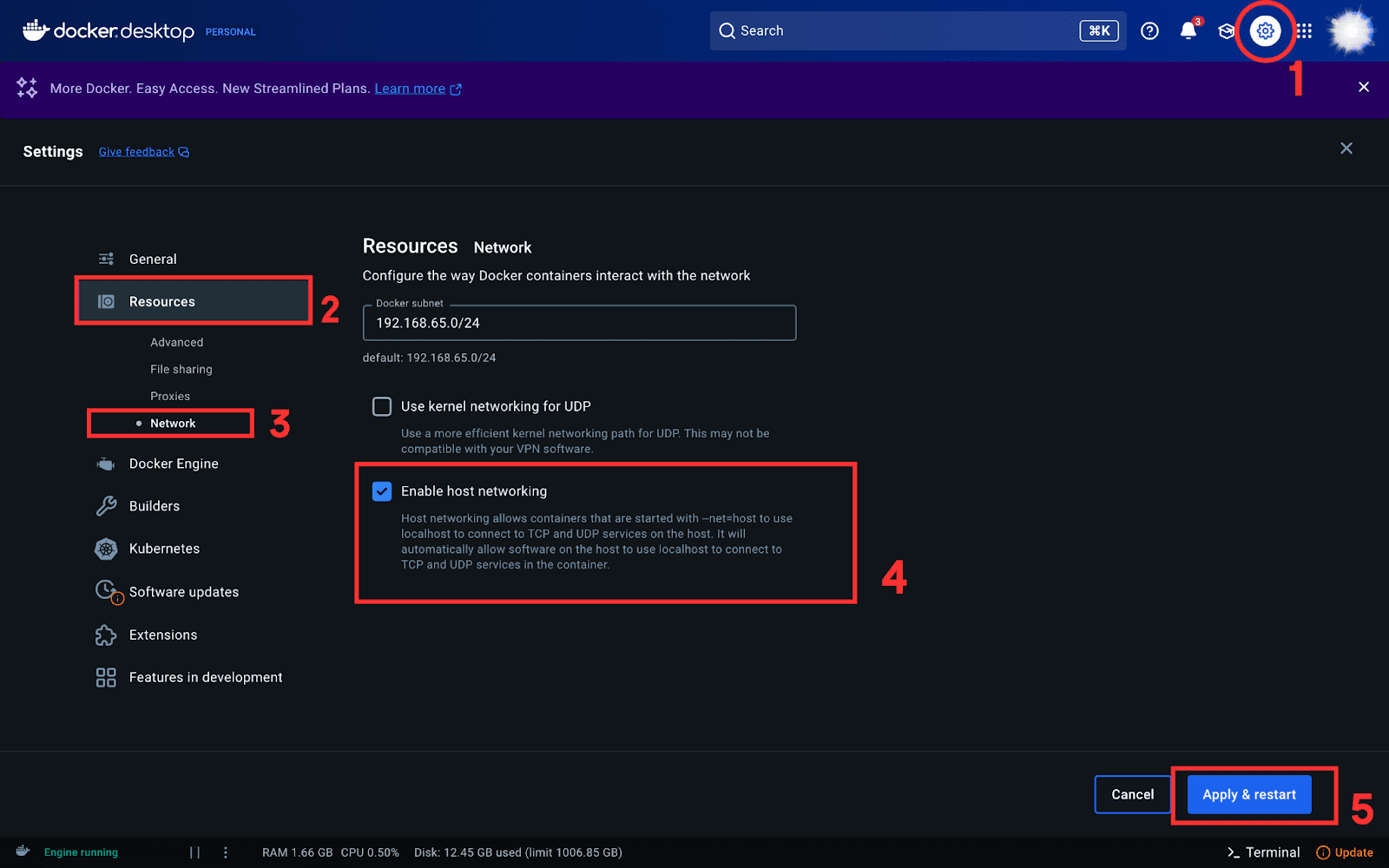
  2. Enable Host Networking: Open Docker settings, navigate to the Resources tab, and select “Enable host networking.”

    Enable Host Networking

  3. Run Open WebUI in Docker: Execute the following command in your terminal to launch Open WebUI:
    docker run -d --network=host -v open-webui:/app/backend/data -e OLLAMA_BASE_URL=http://127.0.0.1:11434 --name open-webui --restart always ghcr.io/open-webui/open-webui:main

    This command runs Open WebUI in a Docker container and connects it to Ollama.

  4. Access Open WebUI: Open your web browser and visit http://localhost:8080. After authenticating, you’ll see a user-friendly interface to interact with your local LLMs. If you have multiple models, switch between them easily using the dropdown menu.
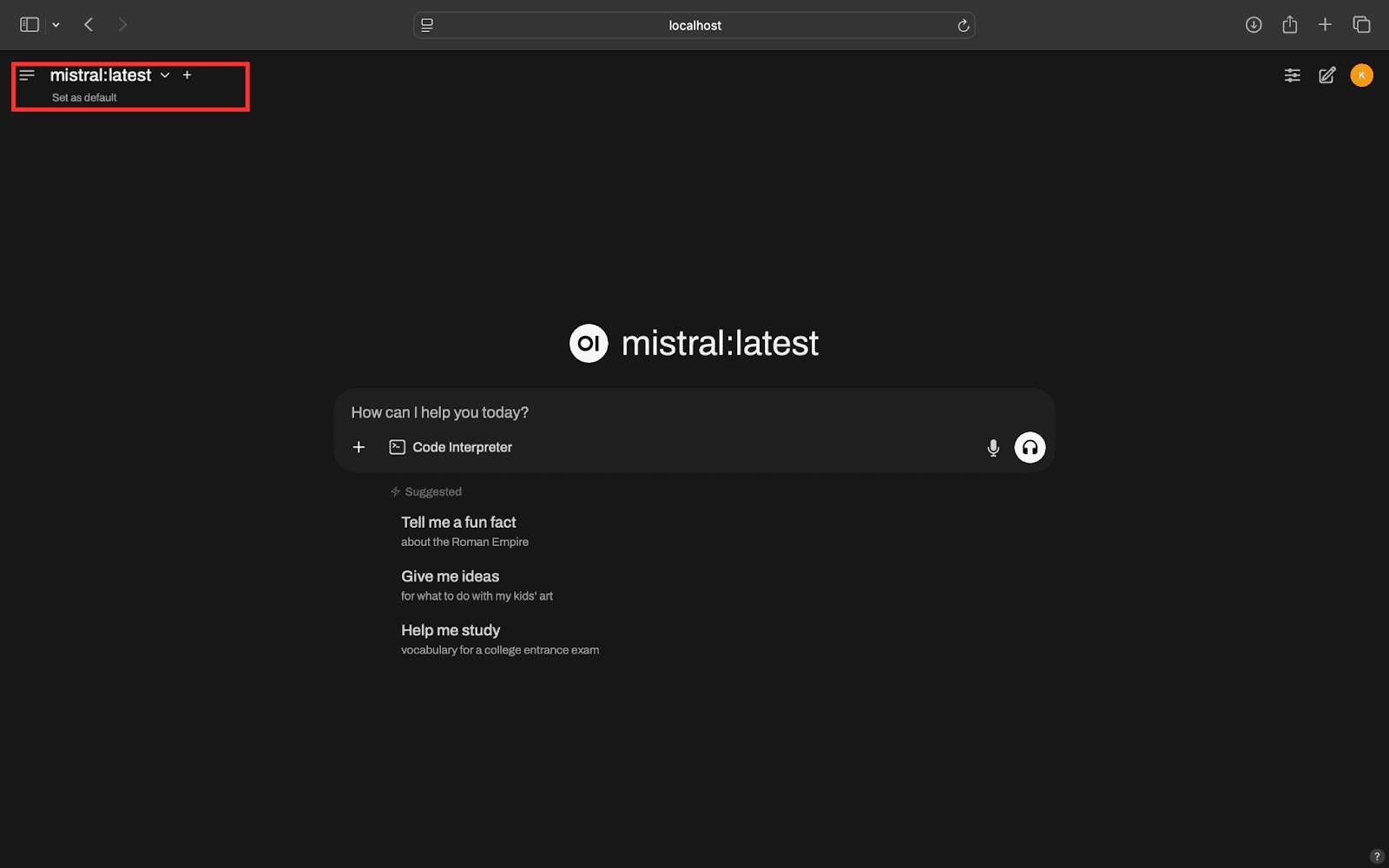
    Access Open WebUI

Step 4: Access LLMs Remotely

Finally, it’s time to access your local LLMs from a remote device.

  1. Check Your Tailnet IP Address: On your local machine, run the following command in your terminal to find your Tailnet IP:
    tailscale ip

    This will return an IP address like 100.x.x.x (your Tailnet IP).

  2. Install Tailscale on Remote Device: Follow the same installation process from Step 1 on your remote device. If you’re using Android/iOS, simply install the Tailscale app and verify that your device is connected.
  3. Access Your LLMs Remotely: Open a browser on your remote device and enter the URL:
    http://<tailnet-ip>:8080

    Replace <tailnet-ip> with the actual Tailnet IP you obtained earlier. You should see the Open WebUI interface, allowing you to interact with your local LLMs.
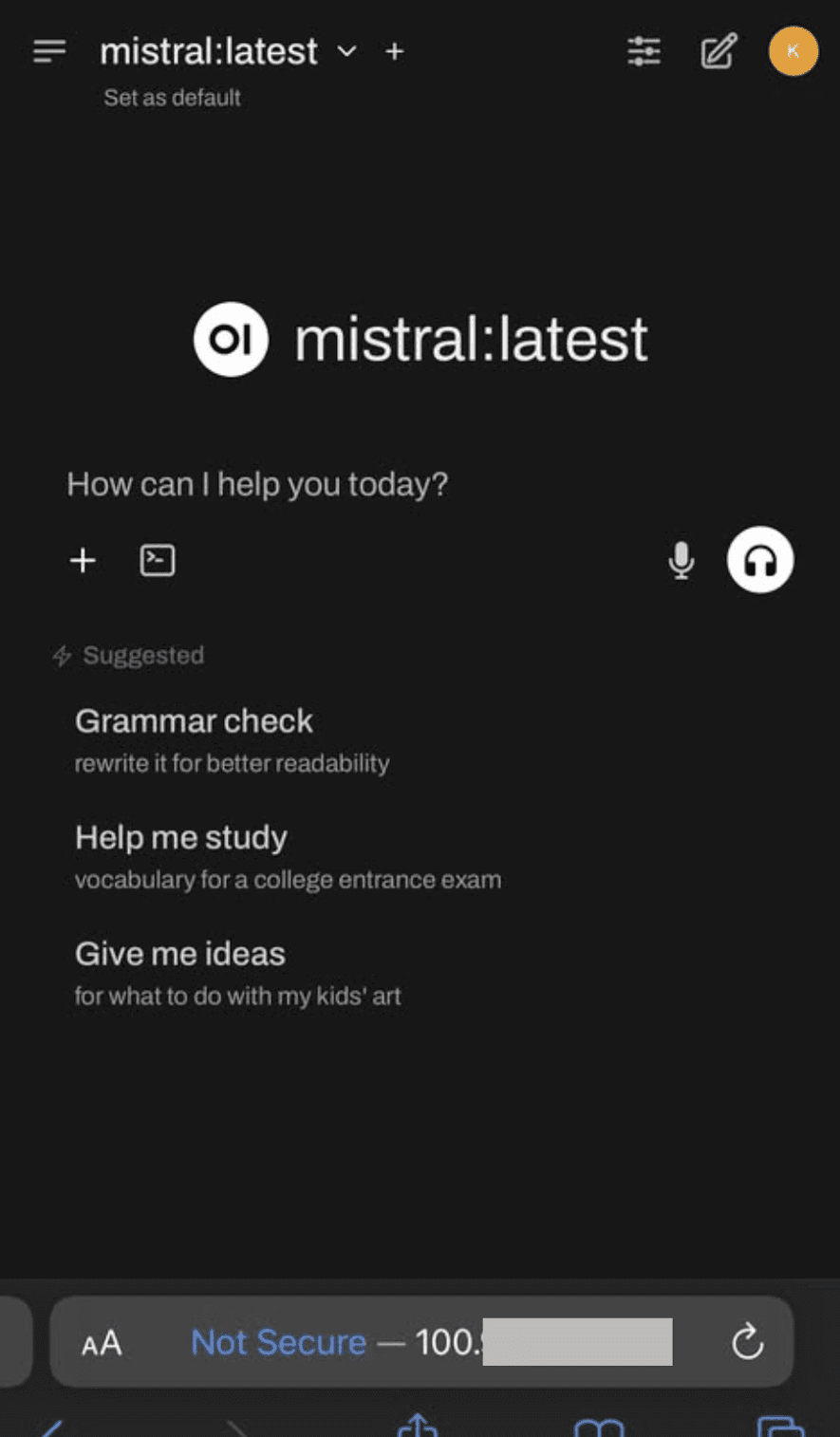
    Access LLMs Remotely

By following these steps, you’ll have successfully set up remote access to your local LLMs, all while ensuring the security and integrity of your data. If you encounter any issues during the process, don’t hesitate to leave a comment for assistance!

About the Author

Kanwal Mehreen is a machine learning engineer and technical writer passionate about data science and the intersection of AI with medicine. She co-authored the ebook Maximizing Productivity with ChatGPT and is a Google Generation Scholar 2022 for APAC. A champion for diversity and academic excellence, she founded FEMCodes to empower women in STEM fields and is recognized for her contributions as a Teradata Diversity in Tech Scholar, Mitacs Globalink Research Scholar, and Harvard WeCode Scholar.

Master PDF Creation and Modification in Python: Quiz by Real Python
Boost Python Performance with Concurrency Techniques – A Guide by Real Python
Ultimate Beginner’s Guide to Mastering Gemini and Google Sheets Integration
Master Python 3 Concurrency: Complete Quiz on the asyncio Module – Real Python
Streamline Your GitHub Workflows with Claude 4 Automation

Sign Up For Daily Newsletter

Get AI news first! Join our newsletter for fresh updates on open-source models.

By signing up, you agree to our Terms of Use and acknowledge the data practices in our Privacy Policy. You may unsubscribe at any time.
Share This Article
Facebook Copy Link Print
Previous Article Unlocking NVIDIA Accelerated Computing for Enterprise AI Workloads with Rafay Solutions Unlocking NVIDIA Accelerated Computing for Enterprise AI Workloads with Rafay Solutions
Next Article Mitigating Hallucinations in RAG: A Comprehensive Guide (Part VIII) Mitigating Hallucinations in RAG: A Comprehensive Guide (Part VIII)

Stay Connected

XFollow
PinterestPin
TelegramFollow
LinkedInFollow

							banner							
							banner
Explore Top AI Tools Instantly
Discover, compare, and choose the best AI tools in one place. Easy search, real-time updates, and expert-picked solutions.
Browse AI Tools

Latest News

Concerns Rise as UK Shops Launch Facial Recognition Technology with Real-Time Police Alerts
News
Cloudflare Launches Temporary Accounts for Seamless Autonomous Worker Deployment
Comparisons
Fidji Simo Resigns from OpenAI’s AGI Leadership Role Due to Health Issues
News
Optimizing Ensemble Diversity for Enhanced Subjective Supervision
Comparisons
//

Leading global tech insights for 20M+ innovators

Quick Link

  • Latest News
  • Model Comparisons
  • Tutorials & Guides
  • Open-Source Tools
  • Community Events

Support

  • Privacy Policy
  • Terms of Service
  • Contact Us
  • FAQ / Help Center
  • Advertise With Us

Sign Up for Our Newsletter

Get AI news first! Join our newsletter for fresh updates on open-source models.

AIModelKitAIModelKit
Follow US
© 2025 AI Model Kit. All Rights Reserved.
Welcome Back!

Sign in to your account

Username or Email Address
Password

Lost your password?