


Understanding Machine Learning’s Carbon Footprint: A Guide to Eco-Friendly Practices
Climate change is a pressing global issue, and one of the significant contributors to this crisis is the emission of greenhouse gases, particularly carbon dioxide (CO2). As we increasingly turn to machine learning (ML) to solve complex problems, it’s essential to recognize that training and deploying these models can also contribute to CO2 emissions. The energy consumed by computing infrastructures—ranging from GPUs to data storage—plays a crucial role in this equation. In this article, we will explore how to track and minimize your carbon footprint when working with machine learning models, particularly those hosted on the Hugging Face Hub.
Pictured: Recent Transformer models and their carbon footprints
The Impact of Machine Learning on CO2 Emissions
The amount of CO2 emitted during model training depends on several factors, including runtime, hardware specifications, and the carbon intensity of the energy sources powering the infrastructure. As a machine learning practitioner, understanding these dynamics can help you make informed choices that align with eco-friendly practices.
How to Calculate Your CO2 Emissions Automatically with Transformers
To begin addressing your carbon footprint, it’s crucial to track your emissions accurately. If you’re using the Hugging Face huggingface_hub library, the first step is to ensure you have the latest version installed. You can easily upgrade or install it with the following command:
pip install huggingface_hub -UOnce you have the library set up, you can leverage its features to calculate your CO2 emissions effectively.
More Read

Finding Low-Emission Models on the Hugging Face Hub
After you upload a model to the Hugging Face Hub, you may wonder how to search for models that are more eco-friendly. The huggingface_hub library has introduced a new parameter: emissions_threshold. This allows you to filter models based on their carbon emissions.
For example, you can search for models that emitted no more than 100 grams of CO2 during training:
from huggingface_hub import HfApi

api = HfApi()
models = api.list_models(emissions_thresholds=(None, 100), cardData=True)
print(len(models))  # Output: 191
This search reveals a variety of options, including smaller models that typically emit less carbon.
To delve deeper into a specific model, simply retrieve and print its details:
model = models[0]
print(f'Model Name: {model.modelId}nCO2 Emitted during training: {model.cardData["co2_eq_emissions"]}')
This simple code snippet provides transparency regarding the environmental impact of the models you choose to work with.
Reporting Your Carbon Emissions with Transformers
For those using the transformers library, it’s now easier than ever to track and report carbon emissions through integration with codecarbon. If you’ve installed codecarbon, the Trainer object automatically incorporates the CodeCarbonCallback, which records emissions data during training.
Here’s how to set it up:
from datasets import load_dataset
from transformers import AutoModelForSequenceClassification, AutoTokenizer, Trainer, TrainingArguments

ds = load_dataset("imdb")
model = AutoModelForSequenceClassification.from_pretrained("bert-base-cased", num_labels=2)
tokenizer = AutoTokenizer.from_pretrained("bert-base-cased")

def tokenize_function(examples):
    return tokenizer(examples["text"], padding="max_length", truncation=True)

small_train_dataset = ds["train"].shuffle(seed=42).select(range(1000)).map(tokenize_function, batched=True)
small_eval_dataset = ds["test"].shuffle(seed=42).select(range(1000)).map(tokenize_function, batched=True)

training_args = TrainingArguments(
    "codecarbon-text-classification",
    num_train_epochs=4,
    push_to_hub=True
)

trainer = Trainer(
    model=model,
    args=training_args,
    train_dataset=small_train_dataset,
    eval_dataset=small_eval_dataset,
)

trainer.train()
Once you complete the training, a file named emissions.csv will be generated in your specified directory. This file will contain a record of the carbon emissions for different training runs. When you’re ready, you can include the emissions data from your final model’s training in its model card, enhancing transparency and accountability.
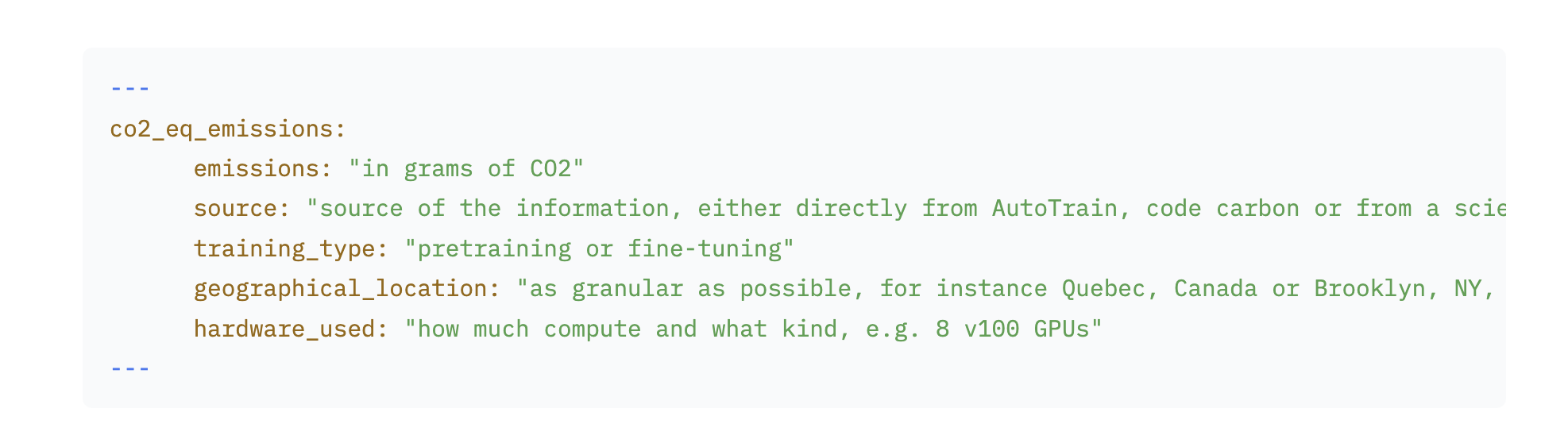
For additional guidance on the metadata format for co2_eq_emissions, refer to the Hugging Face Hub documentation.
Further Readings
As the conversation around sustainability in machine learning continues to grow, it is vital to stay informed about the latest practices and tools that can help minimize our environmental impact. Engaging with resources that focus on eco-friendly machine learning can empower you to contribute positively to this critical global challenge.
By following these guidelines, machine learning practitioners can take meaningful steps toward reducing their carbon footprints while continuing to innovate and push the boundaries of technology.
Inspired by: Source


