


Accessing Local LLMs Remotely Using Tailscale: A Comprehensive Guide
Image by Author | Canva & DALL-E
Imagine this scenario: you’ve set up a powerful language model (LLM) on your local machine. It’s fast, efficient, and operates without the hefty price tag of cloud services. However, there’s a limitation—you can only access it from one device. The idea of accessing your LLM from your laptop in another room or sharing it with a friend might seem daunting. Thankfully, this process can be made seamless with the right tools and setup.
Running LLMs locally is becoming increasingly popular, but the challenge of accessing them across multiple devices can deter users. This guide will explore an effective method to enable remote access to your local LLMs using Tailscale, Open WebUI, and Ollama. By the end of this article, you’ll be ready to interact with your model from anywhere, securely and effortlessly.
Why Access Local LLMs Remotely?
Keeping LLMs confined to a single machine can significantly limit their utility. Here are a few compelling reasons why enabling remote access is beneficial:
- Device Flexibility: Access your LLM from any device, be it a laptop, tablet, or smartphone.
- Resource Optimization: Avoid running large models on underpowered hardware by leveraging remote capabilities.
- Data Control: Maintain full control over your data and processing, ensuring that sensitive information stays secure.
Tools Required
To set up remote access to your local LLM, you’ll need a few essential tools:
More Read

- Tailscale: A secure VPN that facilitates seamless connectivity between devices.
- Docker: A containerization platform that allows you to run applications in isolated environments.
- Open WebUI: A user-friendly web interface for interacting with LLMs.
- Ollama: A management tool for handling local LLMs.
Step 1: Install & Configure Tailscale
The first step in creating remote access to your LLM is installing and configuring Tailscale.
- Download and Install Tailscale: Visit the Tailscale website to download the installation package for your operating system.
- Sign In: Use your Google, Microsoft, or GitHub account to sign in.
- Start Tailscale: Launch the application to initiate the service.
- Terminal Commands for macOS Users: If you’re using macOS, run Tailscale from the terminal by executing the following command to ensure your device is connected to the Tailscale network:
tailscale up
Step 2: Install and Run Ollama
Next, you’ll want to install and operate Ollama to manage your LLM.
- Install Ollama: Follow the installation instructions for your operating system.
- Load a Model: Open your terminal and load a model using the following command. For instance, if you’re using the Mistral model, the command will look like this:
ollama pull mistral - Run the Model: Execute the command to start the model:
ollama run mistralOnce running, you will see the Mistral model in action, allowing you to interact with it. To exit, simply type /bye.
Step 3: Install Docker & Set Up Open WebUI
Docker is crucial for running Open WebUI, which serves as the interface for your LLM.
- Install Docker: Download and install Docker Desktop on your local machine.
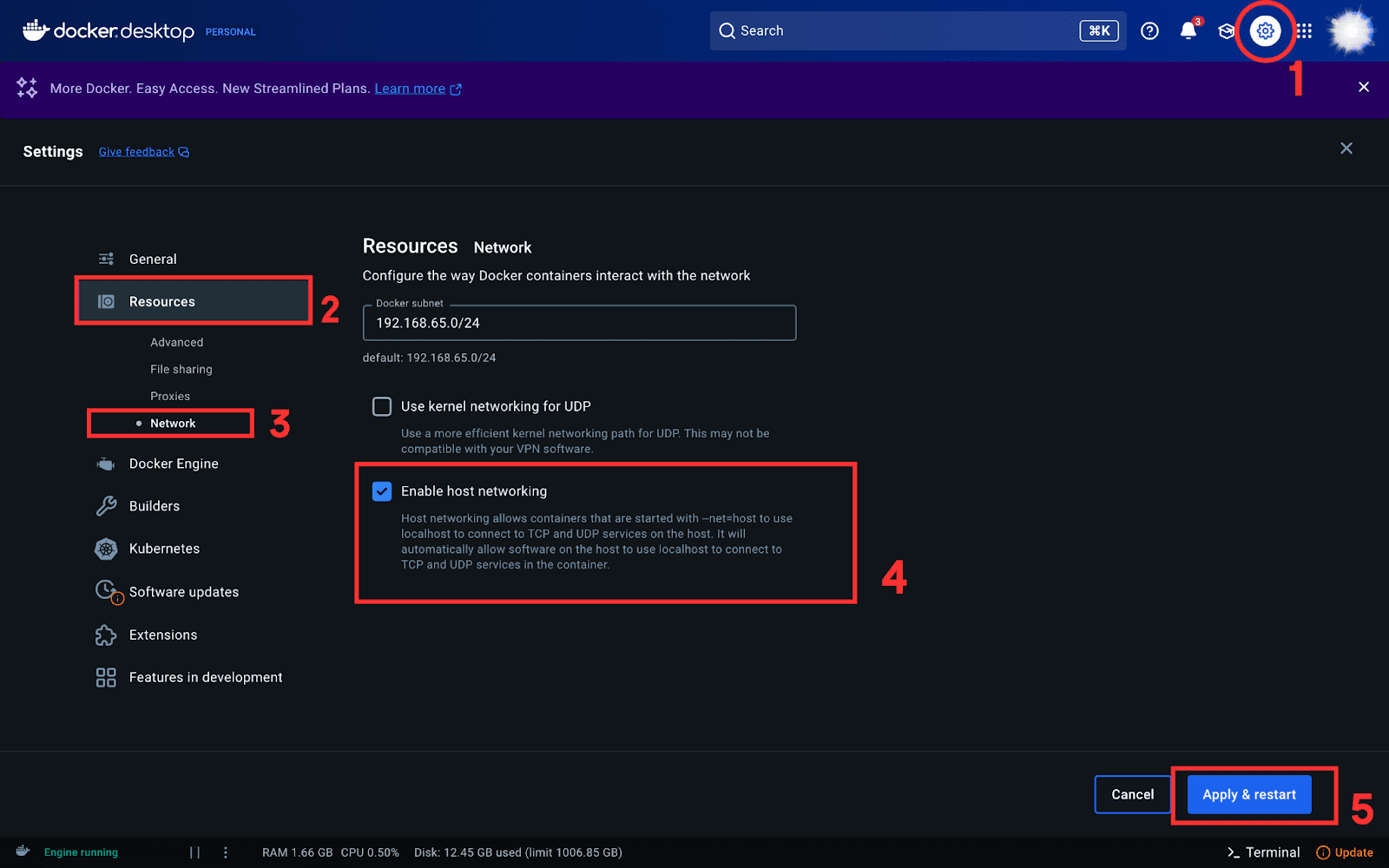
- Enable Host Networking: Open Docker settings, navigate to the Resources tab, and select “Enable host networking.”

- Run Open WebUI in Docker: Execute the following command in your terminal to launch Open WebUI:
docker run -d --network=host -v open-webui:/app/backend/data -e OLLAMA_BASE_URL=http://127.0.0.1:11434 --name open-webui --restart always ghcr.io/open-webui/open-webui:mainThis command runs Open WebUI in a Docker container and connects it to Ollama.
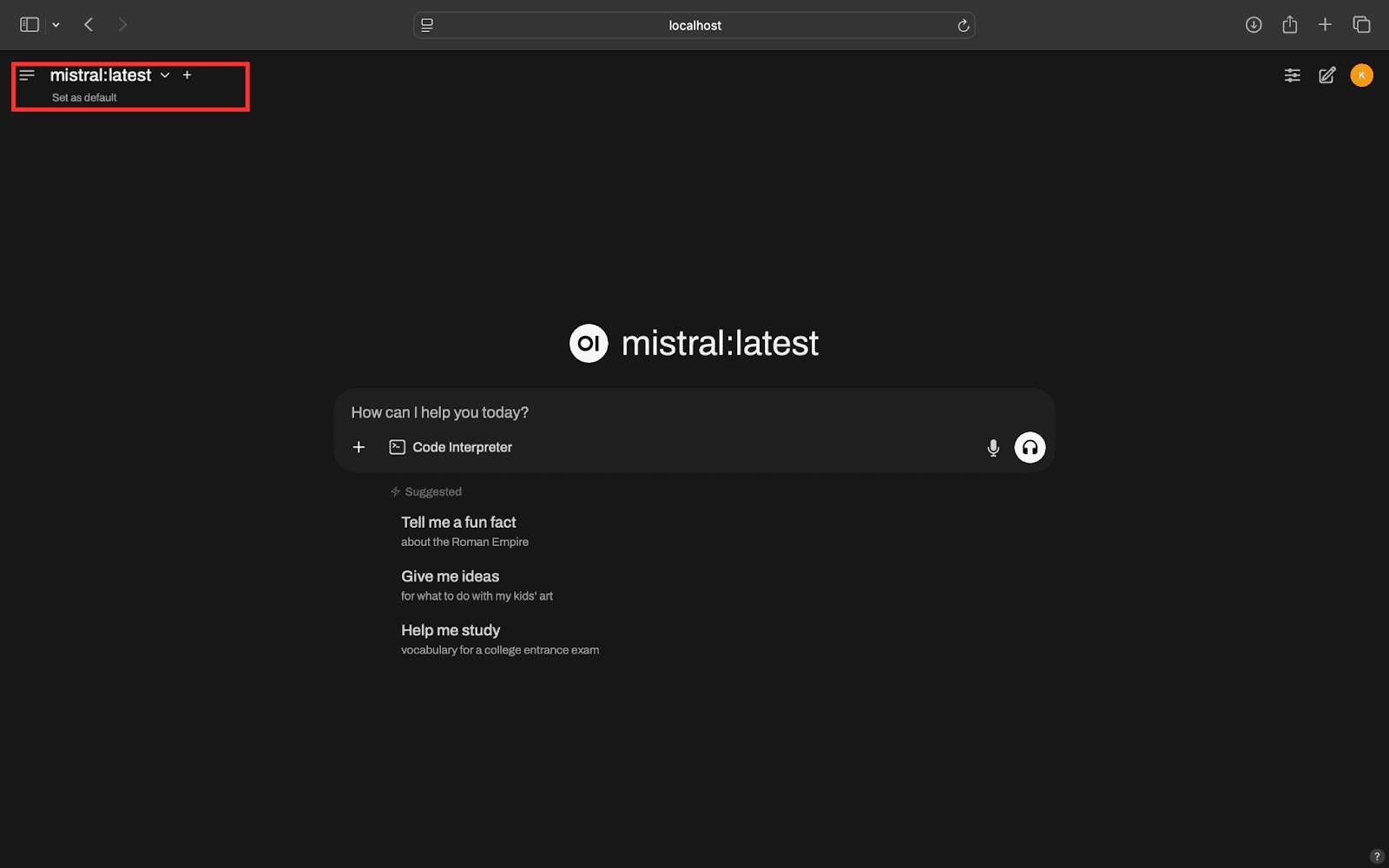
- Access Open WebUI: Open your web browser and visit http://localhost:8080. After authenticating, you’ll see a user-friendly interface to interact with your local LLMs. If you have multiple models, switch between them easily using the dropdown menu.
Step 4: Access LLMs Remotely
Finally, it’s time to access your local LLMs from a remote device.
- Check Your Tailnet IP Address: On your local machine, run the following command in your terminal to find your Tailnet IP:
tailscale ipThis will return an IP address like
100.x.x.x(your Tailnet IP). - Install Tailscale on Remote Device: Follow the same installation process from Step 1 on your remote device. If you’re using Android/iOS, simply install the Tailscale app and verify that your device is connected.
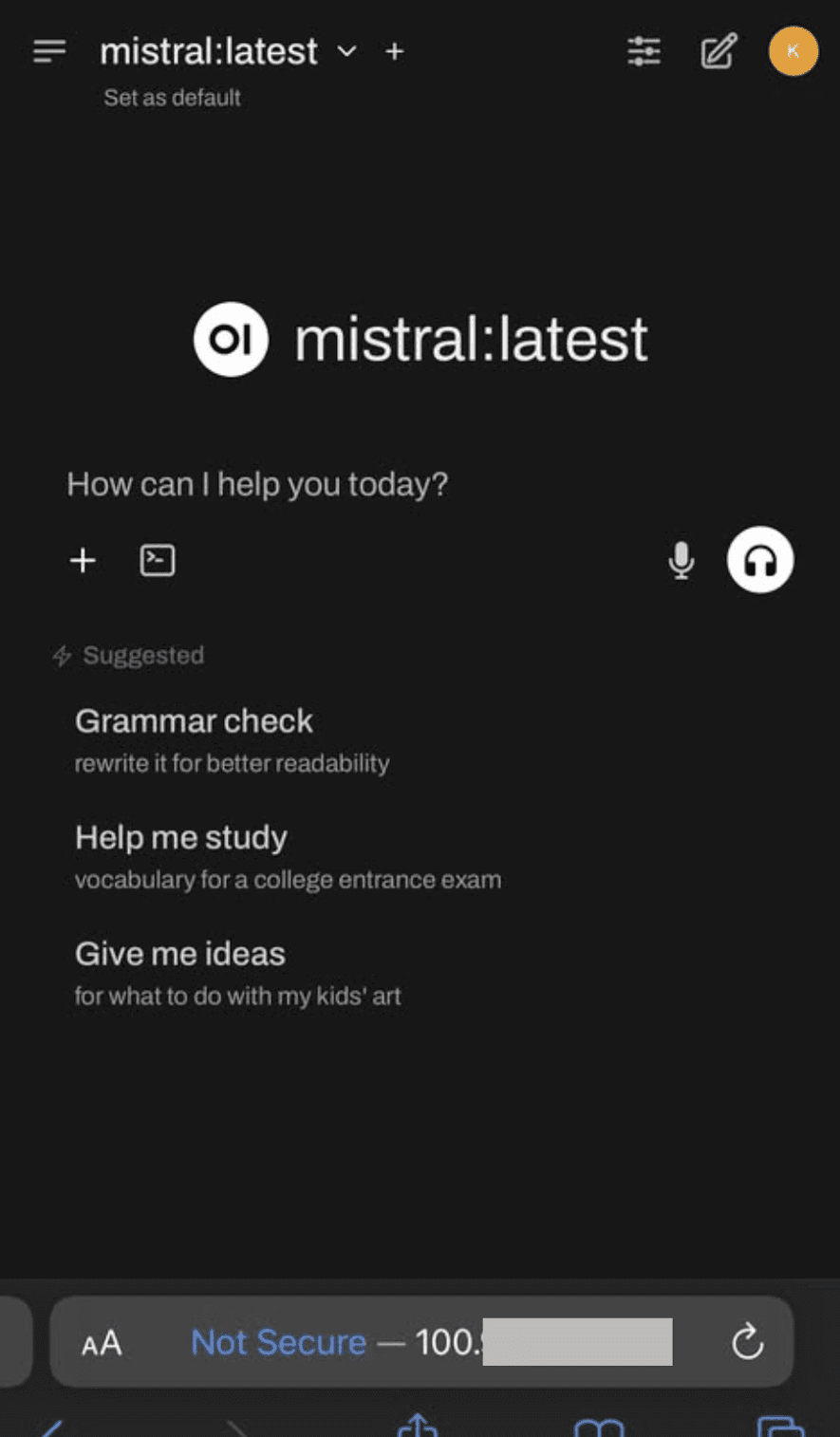
- Access Your LLMs Remotely: Open a browser on your remote device and enter the URL:
http://<tailnet-ip>:8080Replace
<tailnet-ip>with the actual Tailnet IP you obtained earlier. You should see the Open WebUI interface, allowing you to interact with your local LLMs.
By following these steps, you’ll have successfully set up remote access to your local LLMs, all while ensuring the security and integrity of your data. If you encounter any issues during the process, don’t hesitate to leave a comment for assistance!
About the Author
Kanwal Mehreen is a machine learning engineer and technical writer passionate about data science and the intersection of AI with medicine. She co-authored the ebook Maximizing Productivity with ChatGPT and is a Google Generation Scholar 2022 for APAC. A champion for diversity and academic excellence, she founded FEMCodes to empower women in STEM fields and is recognized for her contributions as a Teradata Diversity in Tech Scholar, Mitacs Globalink Research Scholar, and Harvard WeCode Scholar.


